Saturday, August 04, 2007

Groovy + Jemmy GUI automation

This is something that I came up at work, I thought other people outside of work could make use of it as well. If you're wondering about the obscure references to BizApp and such, this is because I removed the name of the actual app from the text.

OK, so we established that Groovy rocks. Now, I've worked at the company long enough to know that there exists a GUI application that kinda does what I need. I know it works, since I can build the GUI app, run it, push the buttons on it, and it creates all the outputs that I need. Now, the only problem is that I'd like to generate a decent amount of these outputs so that I can have a realistic testing scenario.

Now, I'm certain that there is a "cleaner" and "more proper" way of creating these test outputs. However, my colleague who wrote the BizApp app already figured out how to accomplish what the application needs to do (including all the nitty gritty technical details). Would it be nice if I had access to a simple action that does that ? Certainly. Do I have it now ? Nope. When do I need the outputs to test my client app ? YESTERDAY !! So, what should I do ???

Enter the combination of Groovy and Jemmy. We know what Groovy is, now what is Jemmy??? From their site, it's a library that allows GUI driven testing. In effect, it allows me to programmatically specify the actions that I need on the GUI, and execute them. Great !! Step 1 compete !

Now, step 2. Jemmy is a Java library, I don't quite know exactly how to use the API, and I don't quite know the exact sequence of actions that I'll need to perform through Jemmy. So, if I had to write a Java app to exercise BizApp through Jemmy, there'll be a lot of trial and error hindered by compilation. So, what should I do ?? Groovy is an excellent way to explore a particular API, but how can I plug in Groovy and Jemmy together in order to get this job done ?

Alright, alright, enough of the round-about way of explaining things, here is what to do:

* Setup a NetBeans Groovy scripting project. For that, you need a recent NetBeans setup, with the Coyote plugin installed. The same can certainly be achieved with an Groovy Eclipse plugin as well, but since I don't dig Eclipse, I'll show it in NetBeans. After Coyote is installed, you just set up a new project


* Add the BizApp dependencies in the project. In my case, they're in d:JDevelopBuildsBizApp Add all jars from that directory into the project build. Notice the Jemmy libary at the bottom of the screenshot : it can be added either using the NetBeans update center, or by just downloading the Jemmy library and adding the jar as a dependency in the project.


* Add the Groovy/Jemmy bootstrap script and add the content below, inserting the correct main class for the application. This script will launch BizApp, and will then fire up a blank Groovy console where we can execute our little script in. Right click on the Coyote project, and select "Run Project".


import org.netbeans.jemmy.*;
import org.netbeans.jemmy.explorer.*;
import org.netbeans.jemmy.operators.*;

// Fire up the BizApp Application
new ClassReference("com.mycompany.MyAppMainClass").startApplication();

// Get a reference to the BizApp JFrame and put it into the console's script binding.
mainFrame = new JFrameOperator("BizApp");
def bind = new Binding()
bind.setProperty("testScript",this)
bind.setProperty("mainFrame",mainFrame)


// Fire up the Groovy console.
def console = new groovy.ui.Console(this.class.classLoader,bind)
console.run()
Thread.sleep(600000)


* Now, we have both BizApp and the Groovy Console running side by side. Inside of the Groovy console, we can use Jemmy to programmatically manipulate the GUI (e.g. press buttons, select from checkboxes, etc). The Jemmy statements would look something like the script below. You can sometimes get away without firing a new thread, but if you don't the Groovy console script might block the UI and prevent Jemmy from executing it's input on BizApp


t = new Thread() {
// do whatever you need to do with Jemmy, push buttons, select combos, type into text fields, etc.
}
t.start()


* Finally, figure out what you need to do with the GUI app you're working with and script it. Pseudocode looks like this:


select from merchant dropdown
select from vendor dropdown
hit the "Process" button
hit the "Back" button twice (to get to the main screen)


* The Groovy setup script looks something like the one below. I usually execute this first, so that my Groovy console has references to the combos and buttons so that I don't have to import the Jemmy classes every time (e.g. the Groovy console doesn't remember the imports that you might have done in previous executions, but it will remember the variables that you might have declared


// Import Jemmy specific classes
import org.netbeans.jemmy.*;
import org.netbeans.jemmy.explorer.*;
import org.netbeans.jemmy.operators.*;

// Get references to all UI widgets so that we don't have to re-import
// the Jemmy classes every time. The names of these variables will be
// stored in the "binding" and can be accessed in subsequent script/snippet
// executions
merchantOp = new JComboBoxOperator(mainFrame,0)
vendorOp = new JComboBoxOperator(mainFrame,1)
processButtonOp = new JButtonOperator(mainFrame,"Process")
backButtonOp = new JButtonOperator(mainFrame,"Back")


* Write put the script that will actually do the work. The script is typically derived by executing the statements one by one and seeing that they do the right things. The script below processes an order for the first merchant and vendor and then comes back. See the Jemmy API for details on available widgets operators, etc.


t = new Thread() {
merchantOp.selectItem(0)
vendorOp.selectItem(0)
processOpButton.push()
backButtonOp.push()
backButtonOp.push()
}
t.start()


* Finally, the last step is to typically put something together that will do what you need repetitively. My script is below, I have it saved in the Coyote project directory, and I load it up from the Groovy console when it fires up. Note that I typically just hightlight and run the first part of the code first (to get references to all the buttons, etc), and then only run the second part when I need to run BizApp for a long time.


// Import Jemmy specific classes
import org.netbeans.jemmy.*;
import org.netbeans.jemmy.explorer.*;
import org.netbeans.jemmy.operators.*;

// Get references to all UI widgets so that we don't have to re-import
// the Jemmy classes every time. The names of these variables will be
// stored in the "binding" and can be accessed in subsequent script/snippet
// executions
merchantOp = new JComboBoxOperator(mainFrame,0)
vendorOp = new JComboBoxOperator(mainFrame,1)
processButtonOp = new JButtonOperator(mainFrame,"Process")
backButtonOp = new JButtonOperator(mainFrame,"Back")


// Creating orders for a merchant involves creating orders for each vendor for the merchant.
def processMerchantVendor(count,merchants) {
t = new Thread() {
count.times {
try {
merchants.each { merchantIndex ->
merchantOp.selectItem(merchantIndex)
if (merchantOp.selectedItem == "some_merchant") return
(0..vendorOp.itemCount).each { vendorIndex ->
if (merchantOp.itemCount > merchantIndex && vendorOp.itemCount > vendorIndex) {
Thread.sleep(50)
vendorOp.selectItem(vendorIndex)
Thread.sleep(50)
processButtonOp.push()
Thread.sleep(50)
backButtonOp.push()
Thread.sleep(50)
backButtonOp.push()
}
}
}
} catch (Exception e) { }
}
}
t.start()
}

// This creates test orders for all merchants, 10 times in a row.
processMerchantVendor(10,(1..merchantOp.itemCount))

Friday, June 15, 2007

CDJUG June meeting

I was at the Capital District Java User Group (CDJUG) meeting yesterday and it was quite an interesting experience. For starters, I wasn't sure if I was going to the meeting until the last minute, and I didn't even know if I was going to stay the whole time. Secondly, at the last minute I was pleasantly surprised that there were going to be 2 presentations at the meeting.

Anthony will be posting the presentation slides in the next few days on the site, but in the meantime, I'll write a few notes from the meeting.

THe first presentation was on the Sleep (JVM) scripting language by Raphael Mudge. He was a very energetic guy, and it was quite a bit of fun just listening to him. Good work Raphael ! Now, the presentation was great, but I personally am far from being convinced that this is something that I will be investing my time into. Here's the deal:
  1. I've already dabbled into at least a couple of JVM scripting languages (Jython in the past, and now Groovy). THere is a couple of dozen more scripting languages on the JVM which are all interesting to mess around with. Thus, in order to convince a developer to spend time with the language, a scripting language needs to have a number of different characteristics. Granted, Raphi has quite an interesting character, the conversation with him before the presentation was very engaging. At the same time, as with any open source project, the key factor in whether the project will survive is the size of the community. Now, I know Raphi said that there were a bunch of people using the scripting language; however, as it is with a bunch of other open source projects, typically the top 1-2 contenders in the space gather 90+% of the developer attention and community. Although the other languages are not necessarily doomed to fail, they have to find their own niche and a set of committed developers in order to survive. Granted, it seemed like SLeep already has a niche by being used in jIRCii; however, it appeared that Raphi was the sole significant developer. So, the question is, what happens when/if he loses interest ?
  2. Raphi specifically mentioned that he's not trying to be all things to all people, and considering that it is a much smaller project and community than the other scripting languages, that is a very reasonable goal. However, in order to win developer mindshare, it seems to me that having a decent size standard library with utility functions and being able to call into the JVM for everything else, it's not enough any more. I'm judging from my personal experience: one of the major selling points of Groovy to me was that it DID have the convenient, easy xml processing, JDBC access, command line interface, etc. etc. etc, all on top of its seamless integration with the JVM.
  3. Now, this is just me, but I never grokked the Perl syntax. Seriously, this was probably the first language that I looked at when I was first trying to understand what web programming was all about (10 years ago).. and today, I'm still looking at the syntax and it can never fit into my skull...
  4. A couple of notes on the presentation:
  • I didn't quite get it if slee was able to extend the classpath at runtime. Raphi showed thate there was an interactive console (big plus in my opinion, Groovy still kinda sucks in this area); however, one big selling point for me was that at any point I could throw in a couple more jars to the classloader and start loading classes from there.
  • Raphi mentioned that it was his intent to have a clear separation between the sleep program and where it calls into Java; however, for me personally, that was a downside. I found the method calls to be kinda cryptic ( I couldn't quite follow what was happening in a couple of nested method calls - I admit, it might just be my fault, as I haven't seen Objective-C syntax on which the Sleep syntax is based). At the same tie, I didn't see any type of bean properties (e.g. instead of doing foo.setBar('baz'), doing foo.bar='baz'), which for a scripting language is a must in my opinion.
  • The documentation seemed to be excellent
  • All the time when I was looking at the presentation, I was thinking that after NetBeans 6.0 comes out, he should have a Schliemann module for Sleep syntax. :-)
  • Runtime size was pretty small , big plus for embedding uses...

Now, the second presentation was the main reason why I went to the meeting. It was about NetBeans by the author of Pro NetBeans IDE 5.5 Enterprise Edition, Adam Myatt. I was really thrilled to meet him as I had heard from Anthony that he lives in the Capital District area, and that he's a big NetBeans supporter. I was also really looking forward to checking out his book as I had read a couple of good reviews. Adam did an excellent presentation, he was on his game, and I have rarely seen someone present so many things in such a tight and organized manner. He did an excellent job at presenting NetBeans to the people who had gathered and received a very positive response - one of my coworkers actually re-installed NetBeans the next day and was trying stuff out with it. Way to go , Adam ! One thing that totally blew me away during the presentation was the relatively small footprint of NetBeans. When he was doing the demo of NB 5.5.1, the memory rarely went above 100 MB, and I was quite impressed since he was doing quite a bit (and his laptop was not the greatest to begin with). Considering that he did everything from UML diagrams to Visual Web Pack demos, I was VERY impressed. Then, when he was doing the NetBeans 6.0 preview, I was even more impressed as it hovered around 50 MB - AMAZING !

I was personally a bit disappointed that I didn't learn too much from the presentation. I understand that I was not the target audience for it, as I've been a NetBeans user for quite a long time, and I knew 99% of the stuff that Adam talked about. He was covering a lot of ground (more width than depth) as was necessary to present to the majority of the audience. But all in all, I liked the presentation and I'm looking forward to the next time we meet up : maybe we might even get a chance to talk a bit..

Thursday, June 14, 2007

I posted the same message to the NetBeans users mailing list and so far I haven't gotten any responses on it (http://www.netbeans.org/servlets/ReadMsg?list=nbusers&msgNo=93210). I'm re-posting it here again, just in case somebody follows my blog and maybe has ideas about how this is handled best ...

----------------- NetBeans Users maling list post ----------

Can anybody point me to any resources that describe best practices in
managing dependencies between multiple NetBeans modules and suites ?

Overall, here is my problem:

I have a module suite (e.g. MySuite1) that uses a couple of external
libraries e.g. foo1.jar and foo2.jar . I know that NB provides a library
wrapper module, so, I create library wrappers for each one of these
external jars e.g. foo1-lib and foo2-lib . As I understand, when I create
the library wrapper modules, the foo1.jar and foo2.jar are copied into a
private directory for the module e.g.
${foo1-lib}/release/modules/ext/foo1jar .

Then, I create a second module suite : MySuite2, which happens to need the
same two external jars.
- Should I create 2 new library wrapper modules for foo1.jar and foo2.jar
so that I can add the new library wrapper modules to MySuite2, or should I
just use the library wrapper modules that I created for MySuite1 ?
- The problem there is that if I don't create new library wrapper modules
and simply add foo1-lib and foo2-lib modules to MySuite2, then they will
be removed from MySuite1 (and when I want to work on MySuite1, I have to
move them back to MySuite).
- If I create new library wrapper modules for MySuite2 (e.g. foo1-lib2
and foo2-lib2 modules), then there is going to be yet another copy of the
original jars in the new module's releas/modules/ext/foo1.jar, which then
becomes a pain to manage (e.g. if a jar is used in 10 different modules,
each one will have a private copy. Then if I build a new version of the
jar, I need to update all 10 private copies in each module).
- Finally, if I have multiple modules in different suites wrapping the
same jar, if I install 2 different modules suites into the same IDE, amd I
going to have multiple copies of the same jar, or will the IDE figure out
that they are the same (e.g. if all have the same version numbers and code
name base) and only install one of them ?

I would appreciate any tips on how this is handled best.

Thursday, May 31, 2007

JUnit results in free form projects

At work, I'm working with a couple of colleagues on a project. Now, as is probably usual in many other environments, we all use different tools to work on the project: I use NetBeans, and the other two guys use Eclipse and Emacs. Thus, we have agreed that the Ant build scripts will be "the truth" : they have to be maintained and kept as the main tool for building, testing, and running the application.

So, all of that is great; however, I really like my NetBeans IDE, and I just couldn't continue living life without being able to use all of it's goodness. The best thing about NetBeans is that it is Ant based and it has the smarts/hooks to understand what you're trying to do (even in a freeform project), so that it can help you best. Here are the steps that I took to get my testing configuration going for a freeform project:

1. The first thing I did is to review the NetBeans Advanced Free Form Project Configuration

2. I added a compile selected item and debug project tasks (the debug task was quite useful since the code I was trying to understand was kinda convoluted and the debugger was invaluable in understanding how it works):

Here is what I added to my nbproject/project.xml (the ide-actions section):

<action name='debug'>
<script>nbproject/ide-file-targets.xml</script>
<target>debug-nb</target>
</action>
<action name='compile.single'>
<script>nbproject/ide-file-targets.xml</script>
<target>compile-selected-files-in-test</target>
<context>
<property>files</property>
<folder>test</folder>
<pattern>\.java$</pattern>
<format>relative-path</format>
<arity>
<separated-files>,</separated-files>
</arity>
</context>
</action>
<action name='test.single'>
<script>nbproject/ide-file-targets.xml</script>
<target>run-selected-files-in-test</target>
<context>
<property>classname</property>
<folder>test</folder>
<pattern>\.java$</pattern>
<format>java-name</format>
<arity>
<one-file-only></one-file-only>
</arity>
</context>
</action>


My ide-file-targets.xml additions look like this:

<target name='compile-selected-files-in-test'>
<fail unless='files'>Must set property 'files'</fail>
<mkdir dir='${test.classes.dir}'></mkdir>
<javac srcdir='test' source='1.6' includes='${files}' destdir='${test.classes.dir}'>
<classpath refid='run.test.class.path'></classpath>
</javac>
</target>
<target name='run-selected-files-in-test'>
<fail unless='classname'>Must set property 'files'</fail>
<mkdir dir='${test.classes.dir}'></mkdir>
<junit dir='${test.classes.dir}' printsummary='true' showoutput='true' fork='true'>

<classpath refid='run.test.class.path'></classpath>
<formatter type='brief' usefile='false'></formatter>
<formatter type='xml'></formatter>
<test name='${classname}'></test>
</junit>
</target>
<target name='debug-nb' depends='compile, compile-test'>
<path id='sourcepath'>
<pathelement path='src/'></pathelement>
<pathelement path='test/'></pathelement>
<pathelement path='..\\DeclTypeSys\\src'></pathelement>
<pathelement path='..\\DeclTypeSys\\test'></pathelement>
</path>
<nbjpdastart transport='dt_socket' name='perspective' addressproperty='jpda.address'>
<classpath refid='run.test.class.path'></classpath>
<sourcepath refid='sourcepath'></sourcepath>
</nbjpdastart>
<junit dir='${test.classes.dir}' showoutput='true' printsummary='yes' fork='true'>
<jvmarg value='-Xdebug'></jvmarg>
<jvmarg value='-Xnoagent'></jvmarg>
<jvmarg value='-Djava.compiler=none'></jvmarg>
<jvmarg value='-Xrunjdwp:transport=dt_socket,address=${jpda.address},suspend=y'></jvmarg>

<formatter type='xml'></formatter>
<formatter usefile='false' type='brief'></formatter>
<classpath refid='run.test.class.path'></classpath>
<batchtest>
<fileset dir='${basedir}/test'>

<include name='**/**/*Test.java'></include>
</fileset>
</batchtest>
</junit>
</target>

After I did that, my JUnit results look like this:


So, that was OK, but far from great. I thought that there should be a way to invoke the NetBeans JUnit test runner; however, googling around for it didn't help much. Then, just when I was about to lose hope, I ran upon these couple of posts:

Binding Freeform to Output and
UPortal Develop by Greg Sporar .

3.A slight complication on my end : I really didn't want to mess around with the target name of the original build.xml since the other team members were using that already. Thus, I added the following task to my ide-file-targets.xml:

<target name='test-project'>

<antcall target='junit'></antcall>
</target>

and changed the test single target name to "test-run-selected-files-in-test", so that the target name starts with "test" and changed the corresponding entry in my project.xml to run the right target.

And now, my test results look like this:


BEAUTY !!!

Wednesday, May 23, 2007

NetBeans testing with Groovy

I'm making some progress on my thesis, and as one can expect, when I'm writing code, I need to be writing some unit tests for it. Now, I know that Groovy is an excellent candidate for writing unit tests (better than the traditional JUnit stuff that NetBeans supports out of the box). However, it isn't quite obvious exactly how is one supposed to use and run these Groovy unit tests inside of NetBeans (apart form hacking together a crude solution where you have to add a line to a file, every time you need something to the suite() method). I just want to be able to hit the Alt-F6 button and have all of my tests run like magic : no manual additions to the suite, no tweaking.

So, in the end it worked, with a couple of gotchas:
1. NetBeans only seems to like running JUnit Test cases (when you hit Alt-F6) if and only if the test case name ends with "Test". That's kinda clunky, and as far as I know is not a requirement of JUnit itself. THere is nothing preventing you from executing the unit test individually (e.g. right-click -> run) - it runs like magic, but unless the class name ends with "Test", NetBeans doesn't add it to the bucket of tests to run.

2. The coyote module provides some support for testing in Groovy; however, it is not entirely intuitive exactly how that is done. In effect, if you want things to work nicely, you have to do 2 things:
- first, select a class that you want to test, go to Tools - Groovy Tests - Create Tests. That will basically greate a suite and a test in the $PROJECT/groovy-tests directory, as well as a groovy class in there.

A note a couple of months later, after the completion of the thesis project: Groovy worked great for the unit and integration testing of my project. It was fairly easy to script any of the scenarios that I had in mind, and after I had the general template for working with the groovy tests, it became quite easy to have pretty decent test coverage. Actually, the Groovy tests ended up being one of the important reasons for managing to complete the project after losing all of the work that I had done for the last 1.5 years ( yeah, I know i'm dumb not to have a backup, so, if YOU are working on something that important, DO A BACKUP NOW!!!).

Here is what my setup looks like:


1. I have one Java class for each type of tests that I wrote in Groovy. That is useful to be able to say "Test Project" from the project menu, and have all Groovy Tests executed in a meaningful manner.

2. Each Java JUnit subclass, has something like this in it. In effect, that takes the all Groovy files starting with "Service" and makes test suite out of them. One thing to note is that (slightly inconventiently), when the unit tests are run, all test methods from all groovy files show up under the name of the Java test class e.g.


public static Test suite() throws Exception {
TestSuite suite = new TestSuite("HandlerTests");

suite.addTest(AllTestSuite.suite("/home/polrtex/Docs/UofS_SE/Thesis/Implementation/MvpService/test/groovytest","Service*.groovy"));

return suite;
}


3. Finally, the Groovy test has some test methods in it, which get executed when you run the "Test" command on the project.

One final note on the tests themselves. I was using Spring 2.0 for my project, so I wanted to use the same datasource and service classes that the Spring Framework provides. Now, I knew that there were a couple of supporting Spring test classes (e.g. org.springframework.test.AbstractTransactionalDataSourceSpringContextTests), but I wasn't quite sure how to use them when the test are implemented in Groovy. What I ended up doing was to have a base Java class that extended the Spring test class mentioned above, and then have all of my Groovy tests extend that class. One thing that was interesting to note here was that I had to use the Spring autowire by name option, and the population of protected variables e.g.

class DaoTest extends com.troymaxventurs.mvp.test.MvpBaseTest {
//protected ds;);
protected mvpDAO;
protected mvpDataSource;
DaoTest() {
super("DaoTest")
setPopulateProtectedVariables(true)
setAutowireMode(AUTOWIRE_BY_NAME)
}
}


The reason I needed it to populate the protected variables (and not the bean fields) is that when these Groovy tests were instantiated, Spring tried to populate some Groovy specific public properties (e.g. the metaClass property), and thus, it failed along the way. With the population of protected variables, I could specify exactly what I wanted to have populated, without having to worry about any magic that Spring does to discover what dependencies to inject.

Friday, March 30, 2007

Customizing the executable

I'm currently working on an NetBeans RCP based app, spending a huge
amount of my time on the platform. I got around to customizing the
application that I'm working on, and I did recall Geertjan's post about cleaning up
the app from the NetBeans specific stuff. Geertjan did mention that
you could fix the executable icon (on Windows) by using the resource
editor on the built zip file. Well, the altenative is to make a copy
of the executable from your ${harness.dir}/launchers/app.exe to your
local project dir, edit the executable resources by using the Resource
Hacker that Geertjan recommended, and modify the build script to use
the modified executable to use your updated executable for building
your app. So, the changes to my harness build file are as described
below. It is indeed a bit of a hack, as one I'd imagine that it
wouldn't be advisable to edit the global build scripts (that build for
all projects); however, it seems that this is a more universal need
for platform developers - one should be able to totally customize the
branding of the application. While the majority of the work is
possible to be done within NetBeans (with the excellent support of the
platform modules), the ability to customize the icon on the executable
is a very important one as well.

in the body of the build-launchers target ($platform_dir/harness/suite.xml):

right after :

<mkdir dir="${build.launcher.dir}/etc"/>
<mkdir dir="${build.launcher.dir}/bin"/>


Add the following :

<available file="branding/launcher/${app.name}.exe" property="local.launcher.found" />
<antcall target="make-local-launcher" inheritall="true"/>


then, add a new target in the same file

<target name="make-local-launcher" unless="local.launcher.found">
<mkdir dir="branding/launcher" />
<copy file="${harness.dir}/launchers/app.exe"
tofile="branding/launcher/${app.name}.exe" overwrite="false"/>
</target>

Monday, March 26, 2007

Vanished "Sun Smart Ticket" demo app

I'm in the process of scrambling some resources together for my thesis project which has to do with J2ME and video delivery. Now, I've been working on this project (on and off) for the last 1.5 years, so it's been a while since I went back to look at all the resources that I had used at the very beginning.

So, one of the excellent resource that I used from the beginning was the Sun Smart Ticket J2ME & J2EE demo application. I used it to learn the "best practices" when I was getting started, and to a large degree I used it as a template for the first prototype that I built. So, I was quite surprised to find out that the application in question has just vanished from the internet : it was not on the Sun site, it was NOWHERE !!! It was mentioned on a couple of Sun publications, it was in Michael Yuan's excellent Enterprise J2ME book.. but the actual source to the server and j2me client has just vanished.. Evidently, it used to be a part of what the "Wireless Blueprints", which is no more, with nothing to replace it...

Well, to sum it up, I found a copy on a borland site, so I thought I'd give it a mention, just in case somebody else is scrambling to dig up this prescious resource. This just makes me wonder though, why is Sun trying to bury this demo... It was an excellent demo, with some pretty outstanding design ideas (which are a little complex, but after getting over the initial learning curve, they're sheer brilliance).. Well, that's a question that I should probably ask some of the J2ME people... it's open source now, right...

Saturday, March 24, 2007

(Mac vs PC) vs Linux

I'm laughing my head off, the Novel spoofs on the Mac/PC ads (here and here) are hillarious. As I mentioned on a previous post, the originals were quite annoying, and this really neatly hits the spot for me... Rock on, Novell !

Tuesday, March 20, 2007

NetBeans Groovy console

Alright, I didn't think I'd be putting it out there, but since
Geertjan blogged about it, here is the source to what I was doing with
the Groovy console in NetBeans.. I didn't think I'd be putting it
somewhere, since it's a bit of a hack (a proper solution to the
problem would probably use GroovyShell to interpret things and use
purely NetBeans for the creation of the UI end of things). But, since
it's out there in the wild, here is my "New and Improved" NetBeans groovy console.
One cool thing to note is that it picks up the Groovy Console key mappings, thus all shortcuts work exactly the same.


package com.troymaxventures.nbgroovyconsole;

import groovy.lang.Binding;
import java.awt.BorderLayout;
import java.io.Serializable;
import java.util.ArrayList;
import java.util.List;
import javax.swing.Action;
import javax.swing.ActionMap;
import javax.swing.InputMap;
import javax.swing.JComponent;
import javax.swing.JMenu;
import javax.swing.JMenuBar;
import javax.swing.JMenuItem;
import javax.swing.KeyStroke;
import javax.swing.MenuElement;
import org.openide.ErrorManager;
import org.openide.explorer.ExplorerManager;
import org.openide.explorer.ExplorerUtils;
import org.openide.util.Lookup;
import org.openide.util.NbBundle;
import org.openide.windows.TopComponent;
import org.openide.windows.WindowManager;

/**
* Top component which displays something.
*/
final class GroovyConsoleTopComponent extends TopComponent implements
ExplorerManager.Provider, Lookup.Provider {

private static GroovyConsoleTopComponent instance;
/** path to the icon used by the component and its open action */
// static final String ICON_PATH = "SET/PATH/TO/ICON/HERE";

private static final String PREFERRED_ID = "GroovyConsoleTopComponent";
private ExplorerManager manager;
private Lookup lookup;

private GroovyConsoleTopComponent() {
initComponents();
manager = new ExplorerManager();
setName(NbBundle.getMessage(GroovyConsoleTopComponent.class,
"CTL_GroovyConsoleTopComponent"));
setToolTipText(NbBundle.getMessage(GroovyConsoleTopComponent.class,
"HINT_GroovyConsoleTopComponent"));
Binding bind = new Binding();
groovy.ui.Console console = new
groovy.ui.Console(this.getClass().getClassLoader(),bind);
bind.setProperty("console",console);
try {
console.run();
add(console.getFrame().getJMenuBar(),BorderLayout.NORTH);
add(console.getFrame().getContentPane(),BorderLayout.CENTER);
ActionMap am = this.getActionMap();
InputMap im =
this.getInputMap(JComponent.WHEN_ANCESTOR_OF_FOCUSED_COMPONENT);
setShortcutMaps(console.getFrame().getJMenuBar(),am,im);
console.getFrame().setVisible(false);
this.revalidate();
lookup = ExplorerUtils.createLookup(manager, am);
} catch (Throwable e) {
e.printStackTrace();
ErrorManager.getDefault().notify(e);
}


// setIcon(Utilities.loadImage(ICON_PATH, true));
}

private void setShortcutMaps(JMenuBar jmb, ActionMap am, InputMap im) {

for (JMenuItem me3 : getMenuItems(jmb)) {
Action a = ((JMenuItem)me3).getAction();
KeyStroke k = ((JMenuItem)me3).getAccelerator();
im.put(k,a.getValue(Action.NAME));
am.put(a.getValue(Action.NAME),a);
}

}

private List getMenuItems(MenuElement me) {
List thisLevelMenuItems = new ArrayList();
if (me!=null && me.getSubElements()!=null &&
me.getSubElements().length>0) {
for (MenuElement me1 : me.getSubElements()) {
if (me1 instanceof JMenuItem && !(me1 instanceof JMenu)) {
thisLevelMenuItems.add((JMenuItem)me1);
} else {
thisLevelMenuItems.addAll(getMenuItems(me1));
}
}
}
return thisLevelMenuItems;
}

public ExplorerManager getExplorerManager() {
return manager;
}
public Lookup getLookup() {
return lookup;
}
// ...methods as before, but replace componentActivated and
// componentDeactivated with e.g.:
public void addNotify() {
super.addNotify();
ExplorerUtils.activateActions(manager, true);
}
public void removeNotify() {
ExplorerUtils.activateActions(manager, false);
super.removeNotify();
}

/** This method is called from within the constructor to
* initialize the form.
* WARNING: Do NOT modify this code. The content of this method is
* always regenerated by the Form Editor.
*/
//
private void initComponents() {
pnlButtons = new javax.swing.JPanel();
pnlMain = new javax.swing.JPanel();

setLayout(new java.awt.BorderLayout());

}//


// Variables declaration - do not modify
private javax.swing.JPanel pnlButtons;
private javax.swing.JPanel pnlMain;
// End of variables declaration

/**
* Gets default instance. Do not use directly: reserved for
*.settings files only,
* i.e. deserialization routines; otherwise you could get a
non-deserialized instance.
* To obtain the singleton instance, use {@link findInstance}.
*/
public static synchronized GroovyConsoleTopComponent getDefault() {
if (instance == null) {
instance = new GroovyConsoleTopComponent();
}
return instance;
}

/**
* Obtain the GroovyConsoleTopComponent instance. Never call
{@link #getDefault} directly!
*/
public static synchronized GroovyConsoleTopComponent findInstance() {
TopComponent win =
WindowManager.getDefault().findTopComponent(PREFERRED_ID);
if (win == null) {
ErrorManager.getDefault().log(ErrorManager.WARNING,
"Cannot find GroovyConsole component. It will not be located properly
in the window system.");
return getDefault();
}
if (win instanceof GroovyConsoleTopComponent) {
return (GroovyConsoleTopComponent)win;
}
ErrorManager.getDefault().log(ErrorManager.WARNING, "There
seem to be multiple components with the '" + PREFERRED_ID + "' ID.
That is a potential source of errors and unexpected behavior.");
return getDefault();
}

public int getPersistenceType() {
return TopComponent.PERSISTENCE_ALWAYS;
}

public void componentOpened() {
// TODO add custom code on component opening
}

public void componentClosed() {
// TODO add custom code on component closing
}

/** replaces this in object stream */
public Object writeReplace() {
return new ResolvableHelper();
}

protected String preferredID() {
return PREFERRED_ID;
}

final static class ResolvableHelper implements Serializable {
private static final long serialVersionUID = 1L;
public Object readResolve() {
return GroovyConsoleTopComponent.getDefault();
}
}

}

Saturday, February 03, 2007

Better Mac/PC ads

Alright, these are hillarious. I'm always really annoyed by the really lame snotty ads that apple runs, so, here are a couple of REALLY good answers to that... Funny as hell here

Saturday, September 09, 2006

NetBeans module development book

Geertjan is on a roll: he just posted the first chapter of the NetBeans module development book on his blog. He always surpises me by his posts and always makes me say " I wish I had this when I was doing my stuff so that I wouldn't have spent as much time figuring things out on my own".

The first book on NetBeans that I've read is about NetBeans 3.5. Although that was really nice in getting me up to speed on NetBeans at the time, a lot of the things in it (especially on the module development side) don't really apply. It is a really nice book to help you understand the inner workings of NetBeans; however, at the same time, a lot of the inner workings have changed and it becomes pretty difficult to figure out on your own which one of the things in that book are still valid, and which ones aren't. From that perspective, the book that Geertjan has started would be invaluable in that respect.

Since this (hopefully) last semester I would try to focus a lot on my thesis project (which has to do with J2ME mobile video), I probably wouldn't have much time to spend on digging around the NetBeans APIs and trying to figure them out on my own. At the same time, if Geertjan continues to write this book, I could probably try to write a "parallel" set of examples that do the same things that he illustrates for Wicket and Click for Tapestry.

Tuesday, August 22, 2006

Broken links, changed dates, etc...

Well, I guess I almost messed this one up :-) I had initially posted my Tapestry screenshots on Aug. 20th. However, since I had started blogging about it about a month earlier (on Aug 20th), when I posted the actual post, it posted with a July 20th date...

Geertjan mentioned that the project was about a month old and it might have updates, based on the posting date... So, in order not to give the false impression, I went back and updated the posting date to Aug. 20th.. Funny thing is, by then, the posting got picked up and sent out in the NetBeans weekly news newsletter.. and the link was broken... So, in order to fix the link for NetBeans users, I put it back to where originally was in the July entry . I will end up re-posting the same one at both places ( July entry , Aug entry ) to make sure all links are in place...

Damn, I am not used to being responsible and keeping the links to me constant.. :-) Nice and tickly feeling that someone might be interested in the things that I'm doing :-)

Sunday, August 20, 2006

Tapestry NetBeans Plugin

This is repost of my original post - since it was linked by Geertjan and NetBeans weekly news at two different URLs, here it goes...:

I've read up a bit on Tapestry and I've followed Geertjan's blog for quite a while now. I've been a NetBeans fan for quite a while now (since 3.5), and Geertjan's blog has been really eye opening in what is possible with NetBeans. So, a while back, he was really excited about Wicket, and he started working on a plugin for developing Wicket apps in NetBeans. It appears that in the last few months, with the help of Petr they've built quite a nice set up to support Wicket in NetBeans.

What that means about me is that I will try to do something similar, but with Tapestry. What I will try to do is to develop a plugin that will support Tapestry development in NetBeans. Geertjan has already done most of the work here as he has covered a lot of the topics that are required to build a nice web framework support plugin for NetBeans. At the same time, as he seems to point out in one of his latest entries, the information that is required to build such a plugin is either scattered all over the net (or the NetBeans.org site), or is in the source code for his Wicket support plugin . Now that I'm trying to organize my thoughts about this project better, I start noticing that he's also done a great job of documenting his work and his progress along the way. However, I guess giving it a second run wouldn't hurt anyone.

I will probably try to put up a post that would list the proposed features for such a plugin. However, the idea is that the plugin should make working with Tapestry easier, maybe even to the point of not having to know all the nitty-gritty details of exactly how Tapestry works. It should probably have all the nice features of the Wicket plugin, translated into the Tapestry world.

One thing that I've considered in the past is to dig into the Spindle project (which is an Eclipse Tapestry support plugin which has an Eclipse specific and an Eclipse agnostic part) and try to adapt it to work for NetBeans. Now, the thing is that part of my goals includes learning the NetBeans APIs along the way. So, while sometime down the road, looking into using the Spindle implementation and putting up a NetBeans frontend to it would make sense, it appears that for now it would make the most sense to see about implementing the basics in NetBeans only...

I will also probably post more details on the steps required to accomplish this; however, after a few hours of playing around with NetBeans, the tutorials on the site, Geertjan's tutorials, as well as the NetBeans APIs, I've put together the first few things for the plugin... Here are a couple of screenshots that just give me an enormous adrenaline rush...


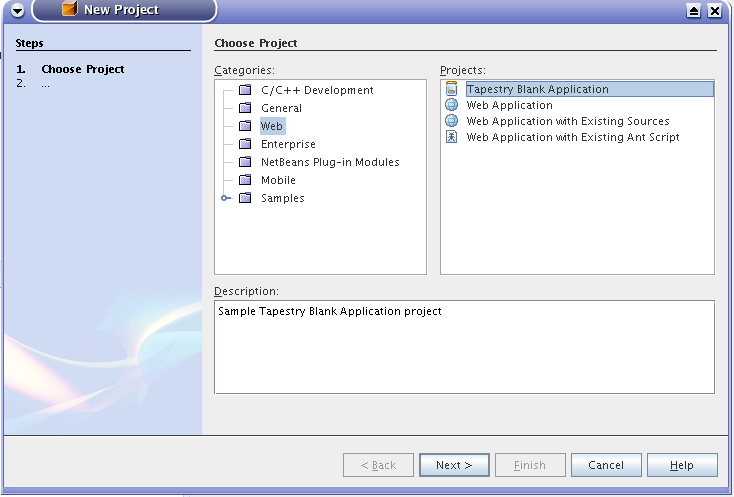
First, a blank Tapestry project, set up and ready to go (I wish I knew how to do this a while back at work, as with both Tapestry and JSF/Facelets I've always kept referring to a sample project that I know it works when I've done new projects...):


Geertjan is probably going to laugh at this one as this is dirt simple to do, but damn, it is nice to be able t accomplish this.


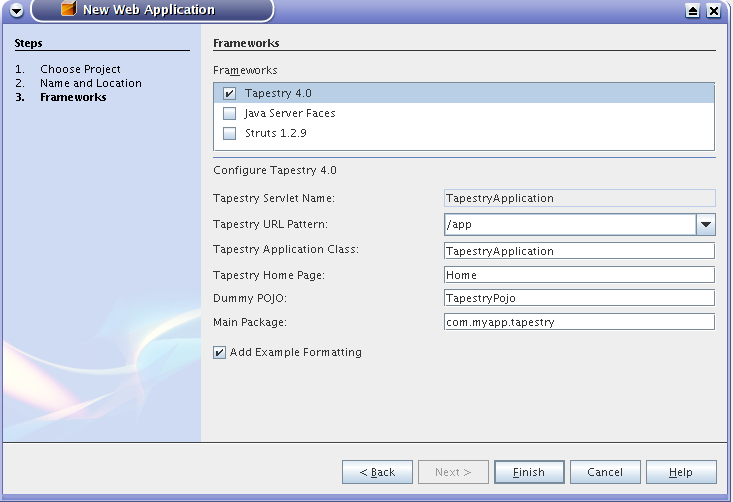
The next one is showing how the Tapestry framework is added to the list of supported frameworks in a standard NetBeans web project. I admit right off the bat that I took all the code from the Wicket plugin and replaced all references to Wicket with references to Tapestry. I still need to remove some of the config options here that really have nothing to do with Tapestry, but this is a very nice start (I was initially having some trouble getting the framework support in - I spent a good number of hours until I found out exactly how to register the framework in the IDE).


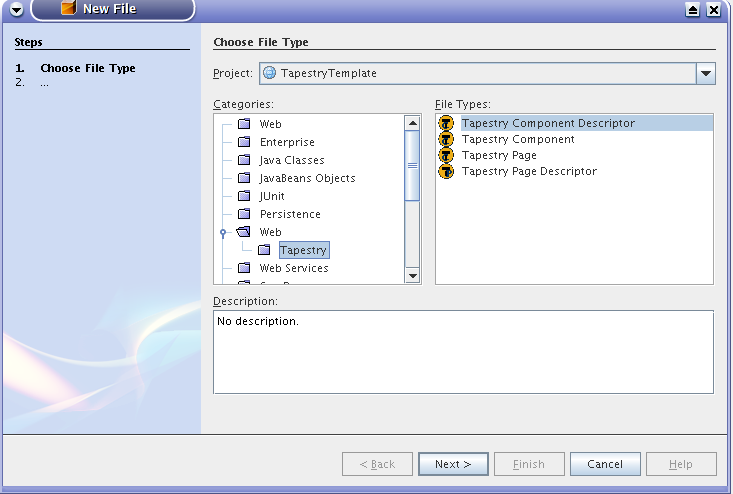
The last one is a list of a couple of new file types added to a project. Most likely, I will have to restrict them to Tapestry projects only, but it's a nice start again. THere is more work to be done to maybe create a graphical customizer for a Tapestry page, but still.. I'm pumped.. :-)


JVM scripting languages review

I've been playing around with groovy for the last couple of weeks and I have to say that I am intrigued by it. In the beginning, when I was starting to hear that there was a Groovy JSR that was aiming to create a standard Java scripting language, I was a bit skeptical : I've been using Jython for the last couple of years for the same puprose and so far it has been working out great for me. I already have a number of working application at work that are doing great. I even bought the "Jython for Java programmers" book a few years ago and it was an excellent guide in getting started. Additionally, in the last few months I've been getting back into the same book on the more advanced topics such as embedding jython in other applications (I even have a little prototype NetBeans plugin that is a live Jython interpeter, very nice in exploring the NetBeans APIs)

So, I said that Jython was generally working well for me for the same purpose. However, I did have a couple of things that bug me about it:
- Because Jython is an implementation of Python on top of a JVM, it is forced (or at least expected) to move at the same speed that python does. So, although Jython works pretty well for JVM scripting and and is generally feature complete, since it's a couple of releases behind Python proper, there is a lot of pressure to keep up with the language. Since one of the reasoning for using Jython is that you can either reuse python skills on the JVM, that really doesn't translate very well since Jython cannot use Python features implemented natively. Thus the "python skills transfer" thing doesn't really work.

- Although I really like the Python newline handling and indentation, it is kinda messed up that it's difficult to use python inside web pages or directly from the command line ('cause you have to maintain and respect the white space, which works great inside a regular script but it sucks when you try to do something like "jython 'for i in os.listdir("."):\n print i\n \n'"... which could have been so much better if there was another delimiter

- Because Jython has to implement the Python APIs, for a java developer to use Jython (e.g. because of the concise syntax or scripting features) he/she has to learn the totally new Python syntax and libraries (although Java most likely has equivalent APIs, using the Java APIs is not consice).

So, back to Groovy. I was initially a bit cynical, since Jython was really doing it for me (for the most part). I remember reading how the Groovy APIs were so unstable, and that it wasn't particularly catching on.. After all, I was a faithful Jython user.

So, one day I decided to give it a shot, and now, after reading about it, I am starting to really like it. For the most part, it appears to have all the goodness of Jython (e.g. concise map or list syntax, etc), however, without having to learn a totally new API. It enhances and improves Java and the JVM (e.g. Grails is really doing some really interesting things on top of Hibernate with GORM). It has a whole bunch of "best-of-breed" features taken from Ruby and Perl, without having to comply with a particular formal specification that isn't particularly Java related (e.g. such as the Python spec). It has Java-like syntax and delimiters and Java code could be used "as is" inside Groovy. Additionally, talking about syntax, it can be used nicely from the command like as in "groovy 'for i in [1,2,3] { print i }" - assuming that the for loop is correct.

All in all, so far Groovy has been really nice. I am really looking forward to the Groovy in Action book coming out so that I can dig more into it. The only thing that I really miss from Jython so far is the interactive console. I mean that Groovy that have a graphical groovy shell that can be used to execute Groovy statements, however, each statement is executed as a separate script and the results of the statements do not build up inside the script context (which might be easily fixable, but so far I don't know enough about it to fix it right off the bat).

Wednesday, July 26, 2006

Tapestry Overview

When I was primarily doing struts and jsp development, I remember reading all these stellar Tapestry reviews and feedback, and was really planning to look into it a little further. In a few instances, I did look into the regular examples that were out there; however, at the time, I was not particularly impressed with it (that was before I looked at JSF). I mean that the syntax seemed to be pretty straightforward; however, there were all of these page and component definition descriptors that seemed to make things so much more verbose ( in a retrospect, I have to admit that at the time I was definitely not getting the idea of what a component oriented framework was all about).

So, maybe a year ago, I was a bit bored with what I'd been learning at the time ( I was kinda stuck in a rut and didn't seem to be learning much beyond the standard Struts/JSP stuff). So, I decided to learn about JSF, since it was a Java standard that seems to be pickup up speed pretty nicely. So, I sat down , read a couple of books on JSF and implemented a couple of projects with it at work and at school. It was definitely an improvement over Struts and a good learning experience. However, along the way I got to learn a couple of the not-so-savory sides of it as well. One of my biggest compaints is that it really smelled of a framework that was designed by a committed : the really simple stuff worked really nicely, it was easy to pick up and learn about; however, as soon as you started doing something not trivial (and I do mean it, not simple, but definitely not difficult stuff - e.g. selecting a row from a data table), you were immediately going up the creek... Although the framework was supposed to abstract you from the http implementation, I found myself having to deal with sessions, http requests and params, almost the same as struts... Somewhere along the way, I encountered Facelets, which was definitely an improvement over the standard JSF implementation and it was then when I realized how nice it was to have plain html implementation of the view using an extra html property for the tag to indicate framework components.

So, about a month ago, after listening to a JavaPosse interview of Howard Lewis Ship I finally decided to really give Tapestry a go. And so far, my impression is "WOW, what a refreshing and nice way to develop web apps". Although, there are a couple of things to learn from the get-go about how to start writing a Tapestry web app, after the initial slight learning curve, writing an app is really, really nice and easy. Especially now that with Tapestry 4.0 the xml descriptors can be by Tapestry annotations inside the actual page or component class makes it a less verbose.. Overall, the impression is that Tapestry came out of a practical need and evolved fulfilling all of these practical needs to make web app development more predictable and productive. Additionally, unlike JSF, Tapestry is not trying to do too many things in addition to simplifying web app development (e.g. JSF is trying to be able to have different view implementation by switching view handlers to do html, wml, and telnet). Thus, Tapestry is not unnecessarily complicated by 'possible' problems that one might have to solve when implementing web apps.

In summary, I will probably try to see what else Tapestry has to offer. So far, I really haven't have had to deal with any of the standard http/web protocols and it has been so wonderfully handled by the framework. The other day, just in a few hours, I was able to reimplement a struts app with Tapestry in a few hours. Additionally, what would have been really messy to implement before was really easy now and I found myself implementing new features that I had been thinking about in a very long time but never went ahead with it because of the mess I'd have to deal with had I had to do it in Struts. The only problem that I have encountered so far was that when I was deploying a tapestry app in JBoss 4.0.4RC1, it was giving me some errors due to the hivemind libraries being loaded multiple times (not a problem in Tomcat, as JBoss has a funny way of handling classloading). Finally, the 4.1 Tapestry release, promises a whole bunch of AJAX features that only vendor specific JSF implementation like Oracle ADF seem to offer ) and I'm really looking forward to seeing what it will bring to the table.

jFreeSafe updates

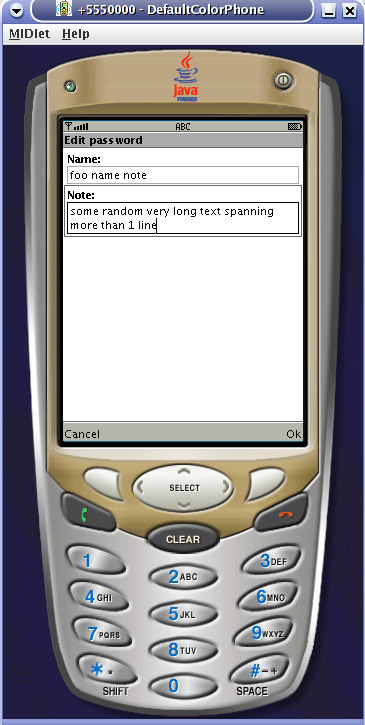
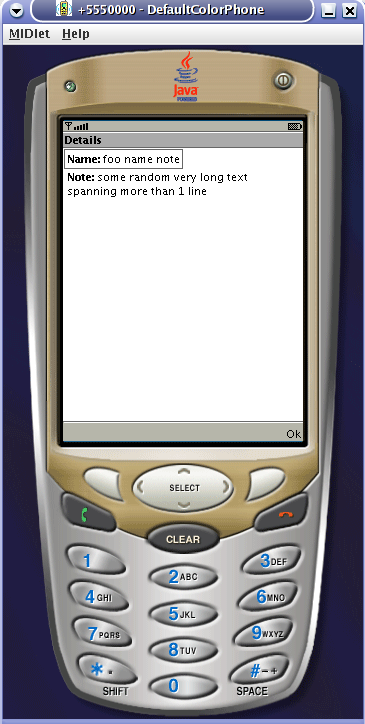
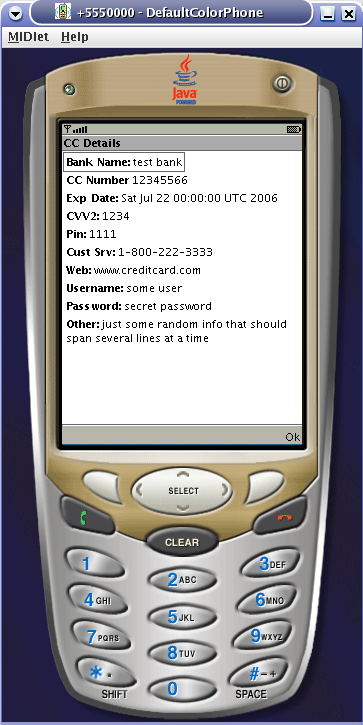
I had been thinking for a while now to sit down and make some updates to jFreeSafe, and today I finally did it. The changes in themselves are nothing particularly exciting or difficult, but they were just 'nice-to-have'-s that I wish I had when I first installed the application.

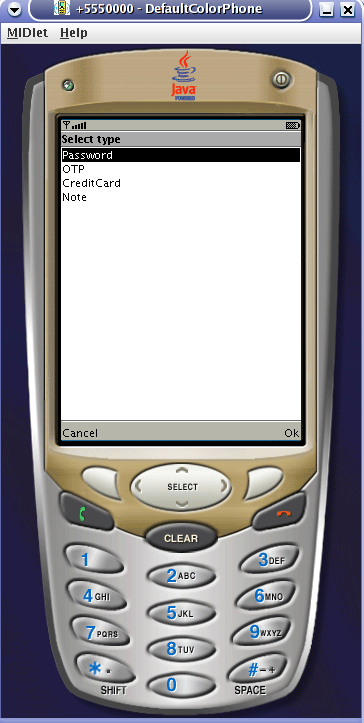
My initial take was to modify the existing PasswordEntry and make the password field there to be a TextField.ANY and make it a bit longer, so that I can store more unstructured information. Actually, I used it to store CC stuff in it. Now, with the new entries, here is how it plays out:
1. CreditCardEntry : has detail fields for a bunch of common properties for a credit card (e.g. CC#, exp date, customer service number, etc).
2. NoteEntry: basically, a very generic note that has a name and allows for a long, unstructured note (actually, each entry has a long last field to allow any unforeseen types of data to be stored in it)

Below are the screenshots:


Friday, July 21, 2006

Tapestry NetBeans plugin

I've read up a bit on Tapestry and I've followed Geertjan's blog for quite a while now. I've been a NetBeans fan for quite a while now (since 3.5), and Geertjan's blog has been really eye opening in what is possible with NetBeans. So, a while back, he was really excited about Wicket, and he started working on a plugin for developing Wicket apps in NetBeans. It appears that in the last few months, with the help of Petr they've built quite a nice set up to support Wicket in NetBeans.

What that means about me is that I will try to do something similar, but with Tapestry. What I will try to do is to develop a plugin that will support Tapestry development in NetBeans. Geertjan has already done most of the work here as he has covered a lot of the topics that are required to build a nice web framework support plugin for NetBeans. At the same time, as he seems to point out in one of his latest entries, the information that is required to build such a plugin is either scattered all over the net (or the NetBeans.org site), or is in the source code for his Wicket support plugin . Now that I'm trying to organize my thoughts about this project better, I start noticing that he's also done a great job of documenting his work and his progress along the way. However, I guess giving it a second run wouldn't hurt anyone.

I will probably try to put up a post that would list the proposed features for such a plugin. However, the idea is that the plugin should make working with Tapestry easier, maybe even to the point of not having to know all the nitty-gritty details of exactly how Tapestry works. It should probably have all the nice features of the Wicket plugin, translated into the Tapestry world.

One thing that I've considered in the past is to dig into the Spindle project (which is an Eclipse Tapestry support plugin which has an Eclipse specific and an Eclipse agnostic part) and try to adapt it to work for NetBeans. Now, the thing is that part of my goals includes learning the NetBeans APIs along the way. So, while sometime down the road, looking into using the Spindle implementation and putting up a NetBeans frontend to it would make sense, it appears that for now it would make the most sense to see about implementing the basics in NetBeans only...

I will also probably post more details on the steps required to accomplish this; however, after a few hours of playing around with NetBeans, the tutorials on the site, Geertjan's tutorials, as well as the NetBeans APIs, I've put together the first few things for the plugin... Here are a couple of screenshots that just give me an enormous adrenaline rush...


First, a blank Tapestry project, set up and ready to go (I wish I knew how to do this a while back at work, as with both Tapestry and JSF/Facelets I've always kept referring to a sample project that I know it works when I've done new projects...):


Geertjan is probably going to laugh at this one as this is dirt simple to do, but damn, it is nice to be able t accomplish this.


The next one is showing how the Tapestry framework is added to the list of supported frameworks in a standard NetBeans web project. I admit right off the bat that I took all the code from the Wicket plugin and replaced all references to Wicket with references to Tapestry. I still need to remove some of the config options here that really have nothing to do with Tapestry, but this is a very nice start (I was initially having some trouble getting the framework support in - I spent a good number of hours until I found out exactly how to register the framework in the IDE).


The last one is a list of a couple of new file types added to a project. Most likely, I will have to restrict them to Tapestry projects only, but it's a nice start again. THere is more work to be done to maybe create a graphical customizer for a Tapestry page, but still.. I'm pumped.. :-)


Wednesday, July 12, 2006

JFreeSafe mystery continued...

Alright, this is a conspiracy. Up until yesterday I was having so much trouble getting JFreeSafe to work properly. For starters, I checked out the sources from cvs (assuming it was the latest version). Now, (unwisely), my initial take was to create a NetBeans J2ME project out of the existing source so that I could reuse all the goodies that my favorite IDE offers. That didn't work...class not found errors in the preverification step

Next step, was.. OK, it must be something with NetBeans, let's try to do the ant build that came with the source. I changed a couple of things in the build.properties (after checking with Laszlo, the lead of the project, it turned out that I was supposed to create a build.local.properties file which seems to be the convention) and attempted a build... and I was in trouble. First, I was getting some obfuscation errors telling me that some classes were missing.. So, I started digging in, trying to find out what's going on.. I removed the test package from cldc-crypto.jar (actually, org.bouncycastle.crypto.test), the class not found error disappeared. I actually had a good jar; however, when I attempted to install it on the phone I was getting a funky "invalid jar" error...

This is where the real hell started.. First, I thought.. it might be something in how jdk 1.5 created the jar (since the original jfreesafe distribution was build on Linux with Blackdown java 1.4.2, and I was trying Sun Java 1.5.0_3). I downloaded the latest update (1.5.0_6), same deal... I tried creating the jar with 1.4.2 sun jdk.. same deal.. I was starting to get desperate as it was getting to be almost 2 am in the morning, I had to get up at 6:30... and I still had nothing working... Oh, well, some things NEVER work on the first day you try to get them to work, no matter how hard you try...

So, the next day, I'm at it again. This time around, I tried the build on a windows box at work.. I was getting a preverification error as before.. and I didn't have much time to play around with it. So, at home, I try a different angle. I poked around the manifest and the jad files to verify that everything is kosher there. I did notice that for some reason the build was creating duplicated Manifest files inside the jar. However, deleting and attempting the reinstall didn't do much. Finally, I did notice a note on the project home page that some people were having a problem with installing 0.2.6.1 and the suggestion was to try 0.2.7.

So, I take 0.2.7 with the same expectation. However, with the first try (after modifying the appropriate properties to point to my wtk 1.0.4 install) it build the first time and successfully install... Voila!!! I was in business again, made the quick modification to the java class that was displaying the passwords, rebuilt, put it on a server, connected to my wlan (btw, my Nokia E61 ROCKS!!!), downloaded and installed the jar, everything works perfectly...

So today, encouraged by yesterday's success, I try to create an NetBeans project based on the existing 0.2.7 sources. Now, even without making it point to the wtk 1.0.4 install (using the default wtk 2.0 setup in NB), it built and I was able to successfully install on the phone... Hm... So, I try it again, this time with the same project that I was having problems previously, the 0.2.6.1 sources.. I used the same NB project from a couple of days ago: build, run, deploy, install on the phone... and IT WORKED !!! Now this is strange, the stuff that didn't work the other day works now...

So, now, I'm completely stumped as to what was exactly causing the problem before. The important thing is that I have the program running, I have a good NetBeans J2ME project that builds and installs successfully, which is an excellent prerequisite to getting some work done on this project.

For starters, I would want to add a few different types of data to be added. Currently, it only has a OTP type - not sure what that means, and a password type - for system/username/password. Since I sometimes put some credit card info in there, that probably one of the types to add - e.g. cc#, exp date, stuff like that in separate fields. The other type is just a "free" note type - something without any additional fields defined. Today, I was also thinking about adding some categories to the entries - e.g. I have quite a number of entries in the app and the list becomes quite long, so a "categorized" mode of display would probably be helpful as well.

Laszlo had mentioned in the forums that he is adding the ability to preserve the data across upgrades and installs, which would definitely a must ( I don't think I want to spend a few hours keying stuff on my phone every time something is upgraded). Additionally, along the same lines, it would probably be useful to have some way of entering the data to be put on the phone in a regular app (or just a csv file or something) and be able to "import" the data into the phone. Finally, Laszlo already has a "server" part of the project (I haven't had a chance to look at the details), and it looks like this will be covering the richer interface/synchronization uses that I mention.

Anyways, I'm looking forward to getting some stuff done with this app. It hasn't had releases in a while. I understand how things are sometimes - when it's just you working on a project, sometimes it's difficult to get motivated and excited, and to put out a release.

Now, just before I posted this, I just found out that Laszlo has a blog on JRoller: check it out - http://www.jroller.com/page/atleta

Tuesday, July 11, 2006

JavaPassion Web Services Programming Course

I will be enrolling and will try to follow this course: Web Services Programming . I am just totally amazed that such a resource is available for free - and, really, for me, that is the best way of learning. I've determined for myself that classroom learning is very inefficient for me : e.g. if the students are not carefully pre-selected to have skills/knowledge on the same level (which usually is not the case), the instructor just ends up spending 90% of the classes teaching to the lowest common denominator.. and in the end, I just end up being bored to death in the actual classes. So, I started looking around if there is a web services class somewhere online (e.g. there are supposed to be these online universities that offer all kinds a classes).. but guess what, nothing is available. There are a number of J2EE/Web services training courses, but you have to go to their training facility (big $$$) or they have to come to your company (bigger $$$). So, it doesn't work for me.. So, I couldn't find an online course that would offer the depth that I need... it's funny, cause I'm willing to pay (actually, through the company) a decent amount of money to get a decent course..

So, this is the best. I really probably should suggest to the instructor in the course.. I don't see why Sun shouldn't make a couple of bucks off of this... Maybe have some kind of "premium" subscribers that might get extra attention... Something like that...

Free Safe

Free Safe is an awesome j2me program that does password encryption and management on a mobile phone. Now, I had something similar on my Palm Zire; however, now that I switched to my Nokia E61, I really miss having access to all of my passwords (e.g. the other day, I was in the bank and I was trying to remember my account number..). This app provides a decent level of functionality and with a couple of enhancements will be doing exactly what I need it to do... Swweeet....